Building Rōnin: I Automated My Japan Job Hunt So I Could Actually Prepare for Interviews
How I built a daily automated job pipeline for my Japan job search — scraping, deterministic scoring, and Discord pings so I can spend my energy on interview prep, not LinkedIn.
MELVIN LIU
October 23, 2026 · 17 min read
My girlfriend is in Osaka, trying to pivot from a role at a jewellery company into product management. I'm in a different timezone, also trying to land a software engineering job in Japan. Between the two of us, we were spending a disproportionate chunk of every week doing the exact same thing: scrolling job boards, reading listings, evaluating fit, bookmarking, forgetting we bookmarked, scrolling again.
This is not an interesting problem. It is an annoying one. And I'm a software engineer.
When something is boring, repetitive, and follows a predictable pattern, the correct response is to automate it and redirect your energy toward the parts that actually matter. In our case, that's interview preparation — system design, behavioral rounds, actually understanding the companies we want to work for. Not manually triaging a hundred job listings a week.
So I built a system.
Rōnin
A rōnin (浪人) is a samurai without a master. In feudal Japan, they were warriors between lords — untethered, wandering, seeking the next engagement. The name felt right for a project that exists entirely in the liminal space between employed and employed again.
Two pipelines run inside Rōnin: mine, targeting backend engineering roles in Japan, and my girlfriend's, targeting PM/PjM roles at international companies. Same infrastructure, completely different scoring logic. We both receive our matches in Discord.
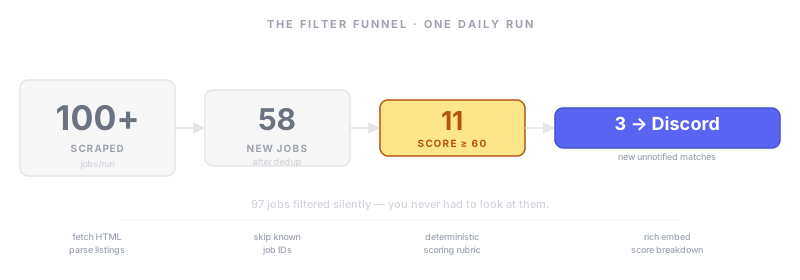
The pipeline has three stages: scrape, score, notify. Before diving into each, here's the full repo layout so you can see how everything fits together.
The Repo
ronin/
├── run.py                        # entry point — boots both pipelines, exits with worst code
├── rescore.py                    # dev util — rescores stored jobs without re-scraping
├── profile/
│   ├── skills.yaml               # your profile — tech tiers, seniority, salary range
│   ├── partner_skills.yaml       # partner's profile — different role focus, different language levels
│   └── resume.md                 # resume in plain text — context the scorer can reference
├── config/
│   └── sources.yaml              # scraper config — URLs, rate limits, pagination settings
├── data/
│   ├── jobs.csv                  # your job store — committed to repo after every run
│   └── partner_jobs.csv          # partner's job store — separate file, identical schema
├── .github/workflows/
│   └── daily-scrape.yml          # cron 01:00 UTC — run pipeline, commit CSV, push
└── src/jjp/
    ├── models.py                 # Job dataclass — single source of truth, CSV serialisation
    ├── config.py                 # loads .env settings — webhook URL, score threshold, paths
    ├── profile.py                # parses skills.yaml into a typed Profile dataclass
    ├── storage.py                # JobStore — in-memory dict, dedup, atomic .tmp CSV writes
    ├── notify.py                 # Discord embeds — batch by char limit, per-embed retry
    ├── orchestrator.py           # main pipeline — fetch → dedup → score → notify
    ├── orchestrator_partner.py   # partner's pipeline — same flow, different sources + scoring
    ├── scoring.py                # your scoring rubric — 6 dimensions → score + breakdown dict
    ├── scoring_partner.py        # partner's rubric — different weights and target roles
    ├── score_adjuster.py         # optional fine-tuning layer on top of the deterministic score
    └── sources/
        ├── base.py               # abstract Source — HTTP client, browser headers, backoff
        ├── source_a.py           # JSON search API adapter — no HTML parsing needed
        ├── source_a_partner.py   # source A variant with partner-specific filters
        ├── source_b.py           # HTML scraper — BeautifulSoup, paginated detail-page fetcher
        └── source_c.py           # HTML scraper — currently disabled
A few structural choices worth calling out:
Two profiles, one architecture. skills.yaml and partner_skills.yaml are plain YAML files — seniority, tech stack tiers, salary range, language levels, preferred role categories. The scoring logic reads from these at runtime. Changing jobs or adapting the system for a different person means editing a config file, not touching Python.
Two orchestrators, not one. The pipelines for my search and my girlfriend's run in separate files because their scoring rubrics, sources, and thresholds are different enough that sharing an orchestrator would require threading config flags through every function. Two files reading from two profiles is simpler and the duplication is minimal.
data/*.csv committed to git. The CSV files are the only persistent state in the system. By committing them back to the repo after every run, the GitHub Actions workflow gets state persistence for free — no database, no cloud storage, no session state between runs. It also means the full scrape history is queryable with standard tools whenever you need it.
rescore.py is a dev tool, not a scheduled job. When you change your salary floor, adjust your skill tiers, or tune the weights on a dimension, you don't want to wait for the next daily scrape to see the effect. rescore.py re-runs the scoring logic against every unnotified job already in the CSV and logs what changed. It's the calibration tool described in the scoring section above.
The Scraping Layer: Plain HTTP First
The first question when building a job scraper is: how do you get listings out of a site that doesn't have a public API?
Most job boards are just HTML. The page you see in your browser is a document the server sent you, and that document contains the job listings. If you can get the server to send you that document without a browser — just raw HTTP — you have all the data you need. Parse it with a library like BeautifulSoup, extract the fields you care about, move on.
The most basic approach is a plain GET request to the listing URL. The catch is that servers aren't naive. If a request arrives without a User-Agent header, or with python-requests/2.28 as the User-Agent, the server knows something is up. Most will return a 403 Forbidden before you even see a listing.
The fix is simple: pretend you're Chrome. Send the same headers a real browser would send. A realistic User-Agent string. An Accept header that lists HTML as a supported content type. Accept-Language. DNT. Even Upgrade-Insecure-Requests. You're not lying about your capabilities — you're just presenting yourself as a normal browser, because the server has no other way to know what you are.
For many job sites, that's genuinely all you need. A few headers and an HTTP client, and the listings arrive.
When Plain HTTP Isn't Enough
Some job boards are single-page applications. The server sends you an HTML shell — nearly empty — and then a few hundred kilobytes of JavaScript run in the browser and fetch the actual job listings through a separate API call. A plain HTTP request gets you the empty shell. No listings.
For these, you need something that runs JavaScript — a real browser, or something that behaves like one. That's where tools like Playwright come in. Playwright drives an actual Chromium browser programmatically: navigate to a URL, wait for the JavaScript to execute and the listings to render, then read the fully built DOM. Slower and heavier, but it sees exactly what a human would see.
The general rule I follow: try plain HTTP first. If the response contains empty content where you expected listings, switch to Playwright.
Not Getting Blocked: The Art of Looking Human
Realistic headers are the first layer of not getting blocked. There are several more worth knowing.
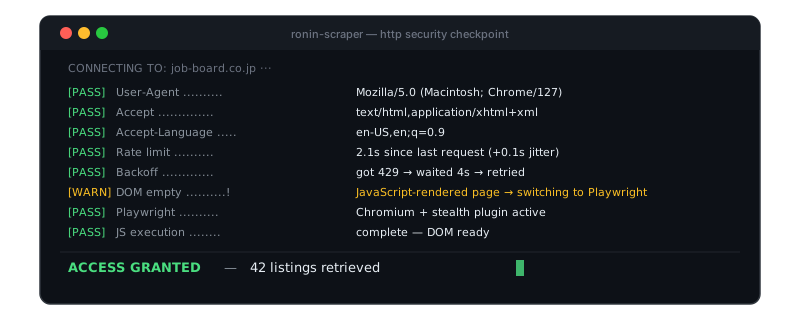
Rate limiting. If you make 100 requests per second, you are obviously not a person. Add a delay between requests — two seconds is usually enough to look human. Add random jitter on top of that, so the timing doesn't look like a metronome. A mechanical two-second cadence is itself a fingerprint.
Exponential backoff. If the server returns a 429 Too Many Requests or a 5xx error, that's the server saying slow down. Don't retry immediately. Wait. Then wait longer if it keeps happening. This isn't just politeness — it's also more effective. A bot that backs off gracefully looks far more like a human with a slow connection.
Playwright stealth mode. Full browsers are more detectable than you'd think. There are fingerprinting signals: the order in which browser APIs initialize, subtle JavaScript timing differences, the presence of certain automation-specific properties in the browser context. Libraries like playwright-extra with the stealth plugin mask these signals and make the browser look indistinguishable from a real user session.
CAPTCHAs. If you hit one, you have options: third-party solving services, stealth configurations that prevent you from ever triggering them, or finding an alternative source for those same jobs. In my experience, most job boards don't deploy CAPTCHAs aggressively on listing pages — they save them for apply flows.
The Scoring Engine: Not All Jobs Are Created Equal
Getting jobs out of a site is only half the problem. The other half is figuring out which ones are actually worth your attention.
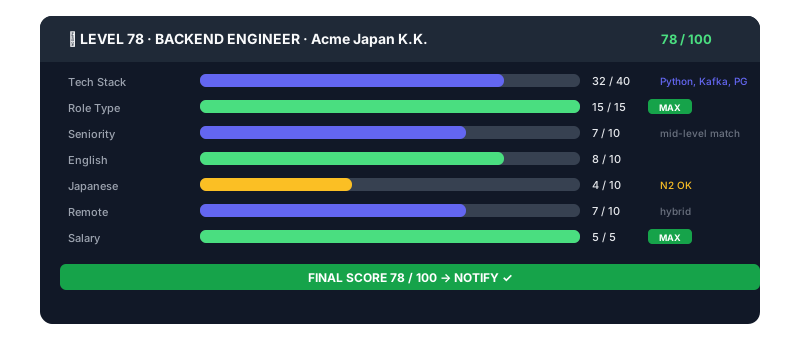
My pipeline scores every new job on several dimensions:
Tech stack overlap. The job is tokenized — title, tags, and description all get split into a set of lowercase tokens. Your skill list is tiered: core skills (things you could talk about for an hour in an interview), proficient skills (comfortable, used in production), and familiar skills (touched it, wouldn't lie about it). Core matches earn 8 points each, proficient earn 4, familiar earn 2. Tech is capped at 40 — the dominant dimension. If a job mentions nothing from your stack, it's a weak signal no matter how well everything else scores.
Role type. "Software Engineer" is a title that can describe anything from pure backend systems work to "maintain this Rails monolith while we figure out what we want to do with it." The detector looks at the title and tags to classify the job into a category: backend, frontend-only, full-stack, mobile-only, SRE, ML-research, and so on. Target categories earn +15. But here's the design decision that matters: negative categories don't just get 0 — they subtract 30 points. A frontend-only role with a great tech stack (if you listed React as familiar) would still score poorly because the role itself is wrong for you. A penalty, not just zero credit.
Seniority. The detector looks for signals in the title first (most reliable), then tags, then the first 500 characters of the description. "Senior", "Staff", "Principal", "Lead" map to senior. "Junior", "Entry", "Graduate", "New grad" map to junior. Everything else defaults to intermediate. Exact match earns 10 points. One level off earns 6. Two levels off earns 0.
Language requirements. Japan's job market spans a wide spectrum: some international companies run fully in English, some require business-level Japanese (JLPT N2), some require native-level (N1). My Japanese is functional but not N1. The detector checks tags first — they often carry explicit values like "Business Japanese" — then falls back to patterns in the description text.
Remote and hybrid policy. Japan still has a large proportion of fully on-site roles. The detector looks for signals like "fully remote", "hybrid", "on-site", and whether the listing accepts applications from overseas.
Salary. Uses the midpoint of the salary range, so a ¥8M–¥16M range isn't unfairly compared against a ¥6M floor. Linear scale between your floor and target. If salary isn't listed, it gets a neutral 3 points rather than 0 — unlisted salary is common and shouldn't tank a match.
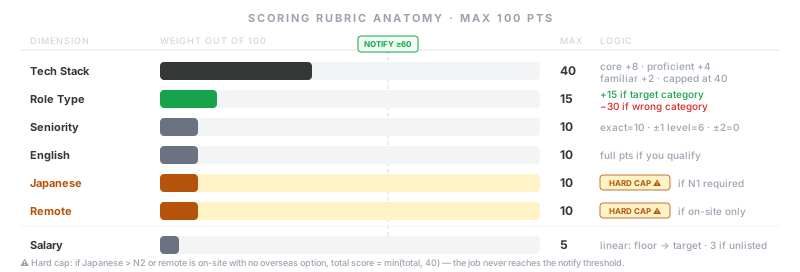
Hard caps: some conditions are disqualifiers, not just penalties
The flat scoring system has a limit. If a job requires N1 Japanese, no amount of strong tech stack match makes it worth my time — I genuinely cannot meet that requirement. Same for a fully on-site role while I'm still applying from abroad.
For these cases, any hard-cap condition forces the total to min(total, 40), regardless of how everything else scored. A 92-point tech match with a hard cap becomes a 40. A 40 never clears the 60-point notification threshold. I never see it, and I never should.
The role type dimension uses a different mechanism for the same reason: negative categories subtract 30 points rather than triggering a cap. The distinction is intentional — a "React Developer" title that also describes heavy Node.js backend work might partially recover from a −30 penalty if everything else fires. A N1 Japanese requirement cannot be recovered from. Both need to be represented differently in the rubric.
Calibration: the 60-point threshold wasn't picked analytically
The threshold of 60 was chosen by running the rubric against a week of scraped jobs and asking: does this feel right? Too high and you hear from one job a week. Too low and it's noise again.
The same applies to the weights. You probably won't get them right on the first pass. This is why the Discord notification always includes the full score breakdown — not just the total, but every dimension's contribution. When a 55-point job turns out to be something you wish you'd seen, read the breakdown and figure out which dimension undercounted it. Adjust the weight. Run again. It converges in a few iterations.
Building your own
The system is general enough to adapt to any job hunt. The scoring logic doesn't care that my profile has Python and Kafka — it reads from a YAML config. To build a version for yourself:
Define your dimensions. What actually matters for your situation? For a Japan software engineer search, Japanese language level is non-negotiable. For a remote-first search in the US, it might be irrelevant entirely. Start with four or five dimensions that represent your real dealbreakers and strong preferences.
Assign point budgets. Weight the things that would make you reject a job most heavily. If a mismatch in role type means you'd never apply regardless of everything else, make it a hard cap, not just a penalty.
Write detectors for each dimension. Keyword matching handles most cases: tokenize the job text, check if known strings appear. For salary and seniority, patterns in the title and description are usually sufficient. The tags that job boards expose are often richer signals than the description text — check them first.
Set a notification threshold and tune it. Start at 60. After a week of runs, look at the jobs that notified you and ask whether they were worth it. Look at the CSV for jobs just below threshold and ask whether any of them should have pinged you. Adjust accordingly.
My girlfriend's pipeline uses the same infrastructure with a completely different rubric — PM/PjM role detection, company internationalism signals, N2 versus N1 Japanese requirements, multilingual candidate bonuses for someone who speaks English, Indonesian, Malay, and enough Japanese to work in Tokyo. Same architecture, different scoring logic.
The Discord Drop
When a job clears the score threshold, it gets sent to Discord as a rich embed.
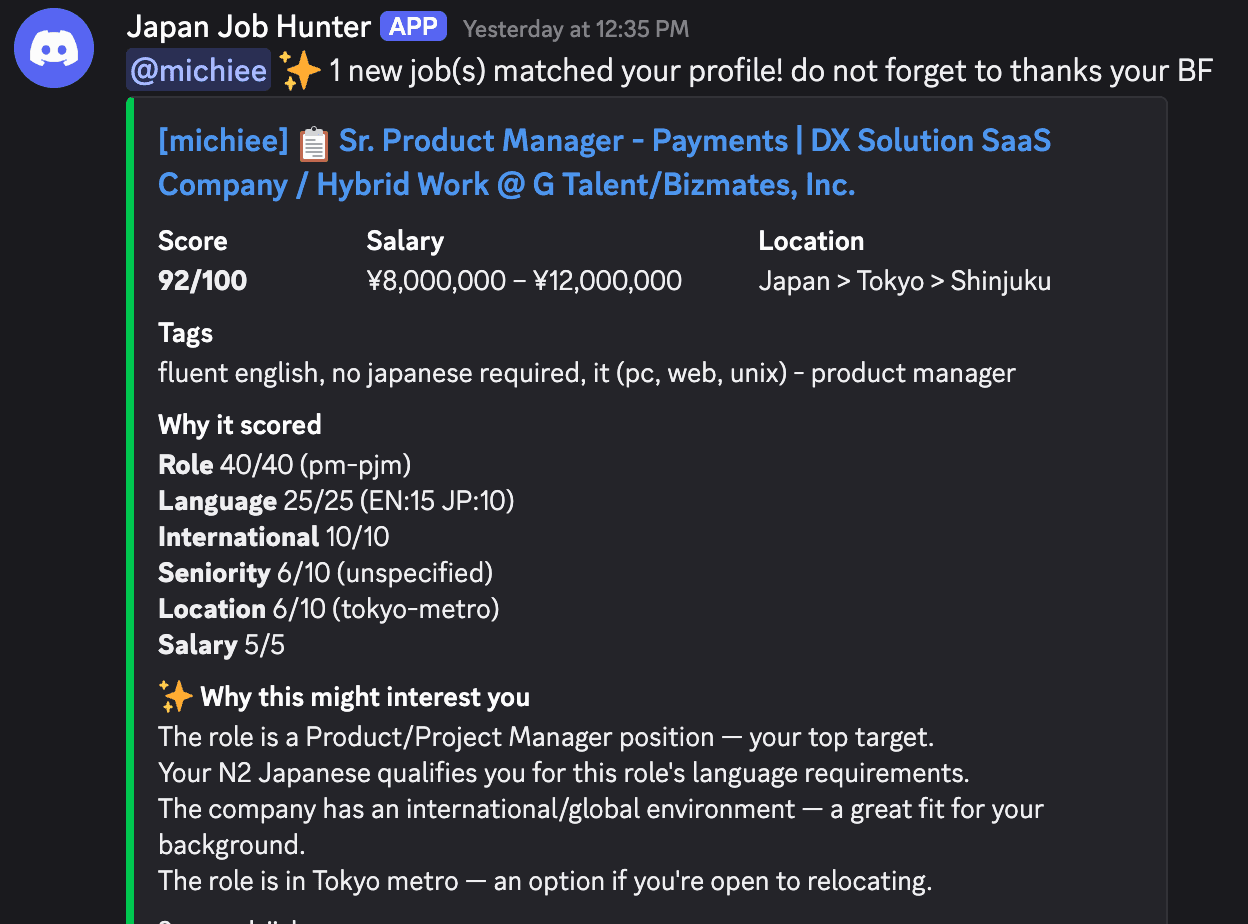
The embed isn't just "here's a job, good luck." It shows the job title, company, score out of 100, salary range, location, tech tags, and a line-by-line breakdown of exactly how the score was calculated. That breakdown matters more than the final number.
A 78 that is entirely driven by a strong tech stack match but penalized on remote policy tells me something different from a 78 that is a perfect role with a salary just below my target. You want to know why before you click. The breakdown makes that visible without having to re-read the full JD.
My girlfriend's notifications also include the message: "@michiee ✨ 3 new jobs matched your profile! do not forget to thank your BF."
She has not thanked me enough.
GitHub Actions: The Cron That Never Sleeps
The entire pipeline runs on a GitHub Actions cron schedule. Every day at 01:00 UTC — 08:00 Jakarta time — a workflow spins up a fresh Ubuntu environment, installs dependencies, runs both pipelines, and pushes the updated job CSVs back to the repository.
No server to maintain. No always-on instance to pay for. Free GitHub Actions minutes. The data persistence is a CSV committed back to the repo after each run, which also happens to be a complete history of every job ever scraped, queryable with grep if you ever need it.
If a scraping source fails — if a job board changes its HTML structure and the parser breaks, returning zero results — the pipeline detects the suspicious empty response and sends a health ping to Discord. Silent failures are worse than loud failures.
What This Actually Buys You
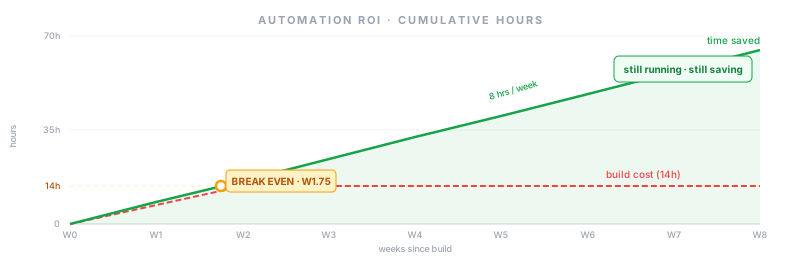
Job hunting is tedious because most of the work is triage. Read listing, assess fit, move on. That's exactly the work that software is good at and that humans are bad at when they have to do it for hours: repetitive evaluation with a consistent rubric, applied at scale. Automate the triage and the job hunt stops feeling like a second job.
What's left is the part that actually requires you: reading the companies you're genuinely interested in, preparing for system design conversations, thinking carefully about how to talk about what you've built. That work takes real energy and focus. It's also the only work that actually influences whether you get an offer.
Rōnin doesn't get you the job. It removes the noise so you can spend your preparation energy on things that might.
It is currently running for two people. Maybe three if I can convince my roommate.
Discussion
Sign in to leave a comment.
Loading comments...